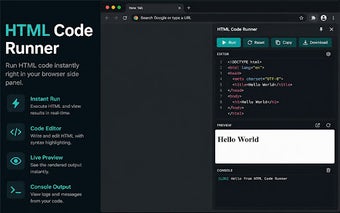
HTML Code Runner: Side-panel playground for quick HTML prototyping
HTML Code Runner, by Bhavin Sathavara, is a Chrome extension built as an instant HTML/CSS/JS playground inside the browser Side Panel. It provides real-time live preview, an in-panel JavaScript console, auto-run updates while you type, local snippet persistence, and one-click HTML export. The tool targets front-end developers, web design students, and UI/UX designers who need a compact, distraction-minimized environment for rapid component prototyping alongside active web pages.
What is the tool used for?
The tool embeds a small editor in the Chrome Side Panel so you can prototype markup, style, and scripts while keeping any active webpage visible. It aims at quick UI experiments and short logic tests that do not require a full IDE. Installation requires no setup or login and execution happens locally, which makes it immediately available for one-off checks and short development sessions.
How does it behave under multitasking and frequent edits?
The developer describes a lightweight footprint designed not to slow the browser during development. Live preview and the auto-run feature update the rendered view as you type, which keeps feedback immediate but also keeps the editor active on every keystroke. Running inside the Side Panel avoids tab switching and lets pages remain loaded, trading background IDE processing for a compact edit-and-view cycle.
Does the tool keep code local and limit external sharing?
The extension executes code locally and requires no external server or account, so snippets persist in the browser's storage and the tool works offline. Local persistence keeps session work on the same browser install and does not propagate snippets to other devices automatically. A built-in download facility exports the current code as a standard HTML file for manual transfer to a project or repository.
Is it a substitute for full-scale playgrounds or IDE workflows?
The tool positions itself as a lightweight alternative to larger online editors, useful for immediate local testing rather than sustained project development. Its minimalist editor forgoes advanced IDE capabilities and it stores snippets locally instead of offering cloud sync, so it does not fit collaborative, multi-device workflows. Users describe it as an effective, compact option compared with full-scale playgrounds like CodePen for short prototyping tasks.
A pragmatic choice for rapid, local prototyping
The tool is a practical option for front-end developers and designers who prioritize rapid, session-focused prototyping alongside active web pages. It trades project-scale collaboration and cloud synchronization for immediate, low-friction testing, so use it as a complement to your main editor rather than a project platform. Expect concise utility instead of integrated, team-oriented development tools.